


Hengs
QIACHIP KR2402A 2CH Wireless Remote Control Switch 433MHz RF Relay Module DC 6-30V 10A Dry Contact for Garage Door Motor
QIACHIP KR2402A 2CH Wireless Remote Control Switch 433MHz RF Relay Module DC 6-30V 10A Dry Contact for Garage Door Motor
Couldn't load pickup availability

Receiver module (KR2402-4) * 1 (including shell)
Technical Data:
1.Input Power: DC 6-30V
2.RF Frequency: 433.92MHZ
3.Standby Current:8.5MA
4.Load power: 1100W
5.Receiver sensitivity: -108dBM
6.Operation mode:Momentary Mode,Toggle Mode,Toggle Mode
7.Output signal: output a switch signal
8.Support remote type: Learning code (1527)
9.Modulation mode: ASK
10.Working temperature:-10 ~ +70°C
11.Size: 68*48*18(mm)
Product Instruction
Symbol description:
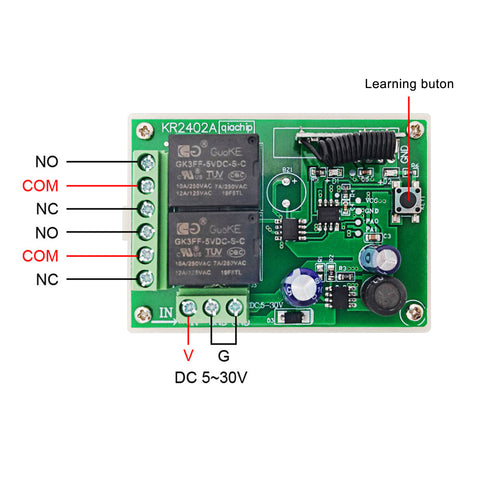
G ----Power -
V ----Power +
NO ---- Often on
COM ---- Public end
NC ---- Normal close end
N ---- Zero Line
L ---- Fire Line
LED ---- Indicator Light
Learning button ----- Learning Button
Note
After clearing the stored transmitters, all transmitters will need to be relearned by the receiver.


Working Modes explanation:
Momentary Mode:
Push the remote button , the relay activates, release the remote button the relay deactivates.
Toggle Mode:
Push and release the remote button , the relay activates.
Push and release the remote button again and the relay deactivates.
Clearing All Stored Transmitters:
Note
After clearing the stored transmitters, all transmitters will need to be relearned by the receiver.
Push the learning button on the receiver 8 times , and the codes will be cleared .
Learning the transmitter :(momentary Mode)
Programing a 2 button transmitter as momentary mode transmitter.
STEP 1
Push and release the learning key on the receiver ONCE.
Wait for a moment , the LED will turn off , indicating you entered the learning state.
STEP 2
Push and release the first button on your transmitter, the LED on the receiver board will flash on then off indicating the button was learned.
STEP 3
Press and release the second button, watching the LED go on and off again.
Wait 3 seconds, the LED will turn on again , indicating system is ready for use.
Learning the transmitter : ( Toggle Mode )
Programing a 2 button transmitter as toggle.
STEP 1
Press and release the learning key on the receiver TWICE.
Wait for a moment , the LED will turn off , indicating you entered the learning state.
STEP 2
Press and release the first button on your transmitter, the LED on the receiver board will flash on then turn off.
Indicating the button was learned.
STEP 3
Next press and release the second button, watching the LED go on and off again.
Wait 3 seconds, the LED indicator will turn on again , indicating system is ready for use
Notice
two button transmitters can only be used as toggle or momentary.
One mode per 2 button transmitter.
(Please note: You let the control panel to learn the remote control, you must press the "A" and "B" button;
Rather than just pressing one of them )
However you can program another transmitter in the other mode.


